


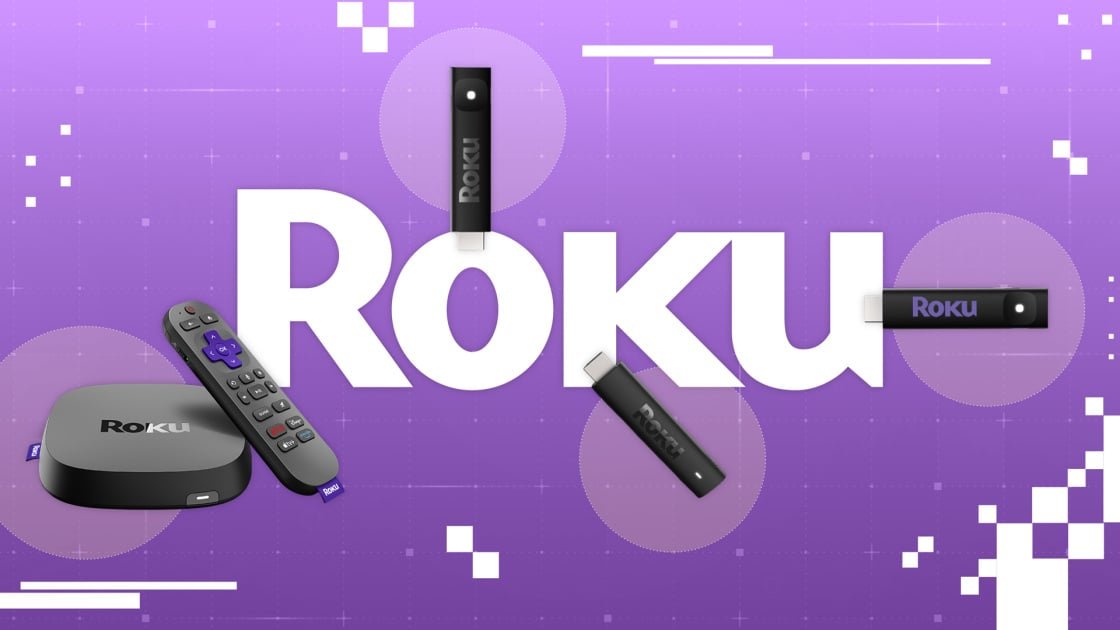
Roku stands as one of the pioneers and most prominent names in the media streaming industry. For nearly two decades, the company has developed hardware and software designed to bring internet-based movies and television shows directly to your TV. Having evaluated every major media streamer launched over the last 15 years, including every iteration since the 2 XS, I am here to help you navigate the current Roku catalog and select the ideal device for your setup.
In general, the Roku OS remains one of the most straightforward and unobtrusive interfaces available, coming pre-installed on numerous smart TVs. If you are dissatisfied with your current television’s software, own an older set that lacks streaming capabilities, or simply want access to Apple AirPlay without investing in a costly Apple TV, a Roku media player is an excellent solution.
Currently, the Roku lineup features four distinct streamers: the Streaming Stick ($29.99), the Streaming Stick Plus ($39.99), the Streaming Stick 4K ($49.99), and the Ultra ($99.99). I have tested each of these units and am prepared to outline the factors you should consider to determine which model best suits your needs.
Roku Streaming Stick (2025) Review
$29.99 at
Amazon$39.99Save $10.00
See It
Roku Streaming Stick Plus (2025) Review
$49.00 at
Amazon$59.99Save $10.99
See It
Roku Streaming Stick 4K Review
$58.46 at
Amazon$79.99Save $21.53
See It
$92.99 at
Amazon$149.99Save $57.00
See It
All three Roku Streaming Stick variants are roughly the size and shape of a pack of gum, plugging directly into your TV’s HDMI port for a convenient, hidden setup. Conversely, the Roku Ultra is a standalone box that must be placed near your television; while it is not particularly bulky, it is certainly more visible than the stick-style models.
Winner: Roku Streaming Sticks (any of them)
Every one of these media hubs runs on Roku OS, the company’s proprietary streaming and smart TV platform. The interface is clean and user-friendly, utilizing large, intuitive tiles for app navigation. While you will encounter some advertisements and suggested content, they are significantly less intrusive than those found on Google TV or Amazon Fire TV devices. Most major streaming services are supported, with the notable exception of Twitch. Furthermore, Apple AirPlay is integrated, allowing you to stream content locally from your Mac, iPad, or iPhone.
Voice search functionality is includedistant like Google Assistant or Amazon Alexa. You can use it to locate content and manage a limited selection of first-party Roku smart home hardware, but it is not robust enough to serve as a comprehensive voice-control hub for your entire home
Regarding resolution, the 1080p Roku Streaming Stick is the only entry in the current lineup that lacks 4K support. This makes it a suitable choice for older, non-4K displays, but for any television manufactured within the last eight or nine years, you will likely prefer one of the other options.
High dynamic range (HDR) and spatial audio capabilities differ across the higher-end Roku devices. The Streaming Stick Plus supports HDR10 and HDR10+, though it omits Dolby Vision. The Streaming Stick 4K introduces Dolby Vision, yet it does not include Dolby Atmos for spatial audio. The Ultra is the most capable, offering HDR10, HDR10+, Dolby Vision, and Dolby Atmos, making it the superior choice if you have a high-quality soundbar system equipped with height channels and rear satellites.
The sticks rely exclusively on Wi-Fi 5 for streaming, though the 4K model offers a slight advantage with a MIMO configuration that can enhance signal range. For the most stable and high-speed wireless performance, the Roku Ultra utilizes Wi-Fi 6. This standard provides improved efficiency across both 2.4GHz and 5GHz bands, even if it does not reach the 6GHz spectrum found in Wi-Fi 6E or 7. While you need a compatible Wi-Fi 6 router to benefit from this, it is a worthwhile upgrade if your TV is positioned far from your router or if your home network experiences heavy congestion from multiple devices. Additionally, the Ultra is the only Roku streamer that includes an Ethernet port for a wired connection.
Each of these media streamers requires power, which can often be supplied by your TV’s USB port. The sticks consume less than 3W and can typically run reliably using the TV’s power. The Streaming Stick 4K may also functions, it includes a dedicated USB power adapter to ensure consistent performance. The Ultra is even more power-intensive and comes with its own dedicated power brick
In short, the Streaming Stick 4K and the Ultra require an available wall outlet, whereas the standard Streaming Stick and the Plus do not.
Winner: Roku Streaming Stick and Streaming Stick Plus
The Roku Ultra includes several advanced features that the sticks lack, primarily centered around the remote control. The included Roku Voice Remote Pro features backlit buttons, a rechargeable battery, a mid-field microphone for hands-free voice search, and a remote-finder feature that triggers an audible beep from the remote when activated via the Ultra unit. The Ultra also provides a USB port for local media playback and the ability to stream audio directly to Bluetooth headphones. The Streaming Stick models do not offer these additional capabilities.
Verdict: The Roku Ultra is Best-Equipped, But May Not be the Best for You
There is no doubt that the Ultra is the most feature-rich streamer in the Roku family. It boasts the superior remote, the most advanced Wi-Fi, and the best support for HDR and audio formats. However, it is also the largest and most expensive option, and depending on your specific home theater setup, you may not require all of its capabilities.
If your goal is simply to add streaming functionality to an older 1080p television, the Roku Streaming Stick is all you need, costing less than one-third the price of the Ultra. For 4K setups, the Streaming Stick Plus remains a top budget-friendly contender; even without Dolby Vision, its support for HDR10 and HDR10+ is excellent (and many Samsung TVs do not support Dolby Vision at all). Unless your router is located a great distance from your living room, the standard Wi-Fi 5 on the Plus should perform perfectly well. The Streaming Stick 4K serves as a solid upgrade over the Plus, providing MIMO Wi-Fi and Dolby Vision for an additional $10, all while remaining half the price of the Ultra.
The premium Roku Ultra is the clear choice if you have high-end audio and Wi-Fi equipment or desire the most advanced remote, but for most users, one of the streaming stick models will likely meet your needs while saving you money.











2 thoughts on “Which Roku Is Right for You?”